
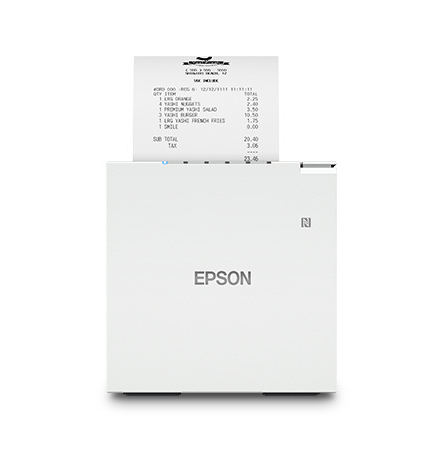
Epson TM-M30III POS Receipt Printer
The Epson TM-m30III is a thermal printer used with POS systems, in retail stores, and restaurants for printing receipts and order tickets.
The Epson TM-m30III replaced the Epson TM-m30II in 2024, and is an improvement on the previous model with regards to speed and reliability.
We are often asked quetions about compatibility and consumables, and and such we have sumamrised it below:
What Epson TM-m30II models are available in Australia?
There are two models : One with USB and Network connections, and another with USB, Network, Bluetooth and Wifi
Colours available are black and white
The current model mumbers in australia are as follows:
C31CK50231 TM-m30III-231 Built-in USB, Ethernet, BT iOS, Wi-Fi - WHITE
C31CK50232 TM-m30III-232 Built-in USB, Ethernet, BT iOS, Wi-Fi - BLACK
C31CK50201 TM-m30III-201 Built-in USB, Ethernet - WHITE
C31CK50202 TM-m30III-202 Built-in USB, Ethernet - BLACK
Optional accessories:
C32C881017 Wall Hanging Bracket for TM-m30 / TM-m30III
C32C891324 OT-WL06 Wireless LAN Dongle 5.0/2.4Ghz
1YWM30III Coverplus 1yr Service Pack TM-m30III
2YWM30III Coverplus 2yr Service Pack TM-m30III
Will the Epson TM-m30II work with iPad, Android , Mac and PC?
The Epson TM-m30III printer will work as standard with Max and PC. For apps on Android and IOS (ipad/iphone),the App provider must make the printer compatible in order for it to be found on the device, so please check with your app provider to ensure that it is compatible, or contact us to double check for you. With the Lightspeed app for example, the TM-m30III Bluetooth printer connect wirelessly via Bluetooth to print receipts (using iOS and/or Android) and kitchen tickets (iOS only) in the Retail POS (S-Series) app.
What size paper rolls does the Epson TM-m30II use?
The Epson TM-m30III printer will accept a roll with a width of 80mm wide, and an outside roll diameter of 80mm (80x80). POS99 supplies 80x80 Economy Rolls and 80x80 BPA Free rolls.
Will the Epson TM-m30 connect to multiple devices at the same time?
When used with the Ethernet connection, the printer can be found from multiple devices
What is included in the printer box?
Epson TM-m30 printer
Australian Power adapter cable
Wall adapter
Starter roll of thermal paper
Manuals
Which POS apps does the Epson M30III work with?
Depending on the device used, the printer works with the below apps:
Square - POS, Retail, Restaurants, and Appointments
Shopify - POS for retailers using Shopify's robust point-of-sale system
Vend and Lightspeed - POS for Lightspeed Retail and Lightspeed Restaurant
Toast POS - Toast all-in-one restaurant management platform
Clover POS - Comprehensive POS solutions for various business types
Revel Systems - Supports the Revel iPad POS system, ideal for restaurants and retail stores.
POS'99 is an official accredited Epson Australian Supplier.